OpenData API
1️⃣ Introduction
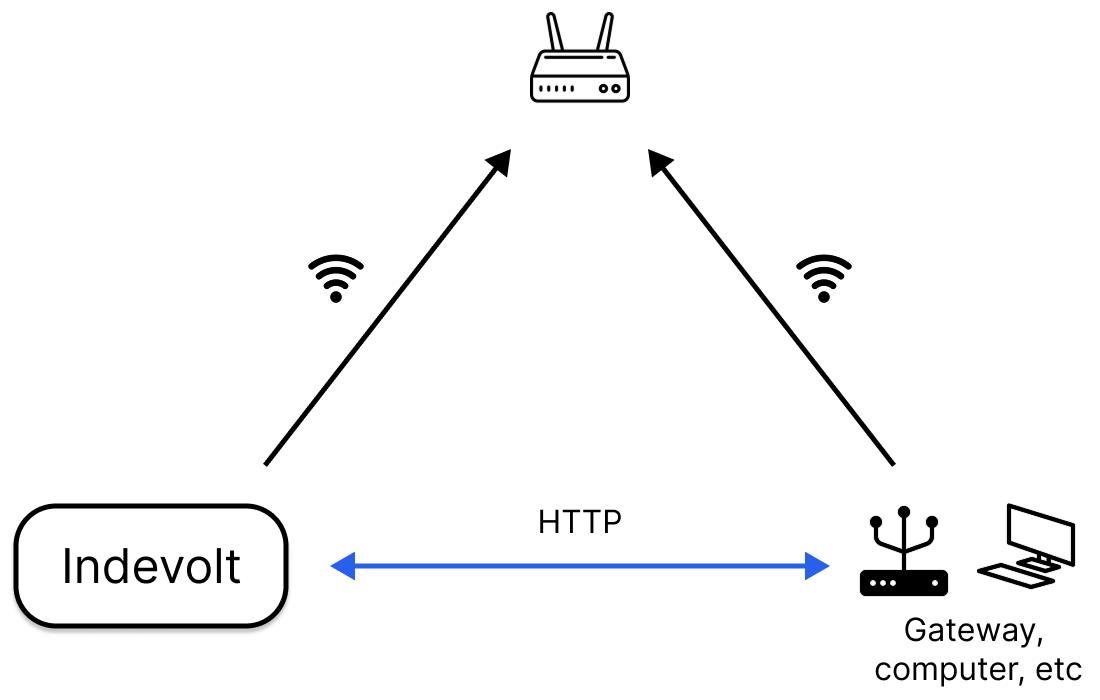
OpenData is a lightweight communication framework designed for WiFi-based INDEVOLT IoT devices. Devices connect to local networks via WiFi, supporting both active data push and response to external queries.
Core Features
- Device data acquisition: Real-time pulling of device data.
- Device control: Dynamic adjustment of device parameters and configurations.
Use Cases
-
Receiving external HTTP query requests.
2️⃣ Preparations
Step 1: Install Tools
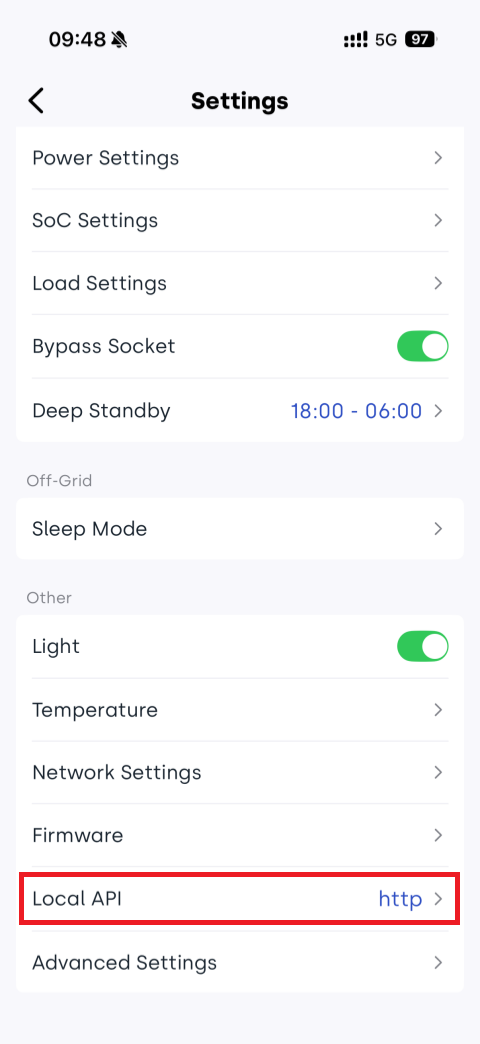
Step 2: Enable API
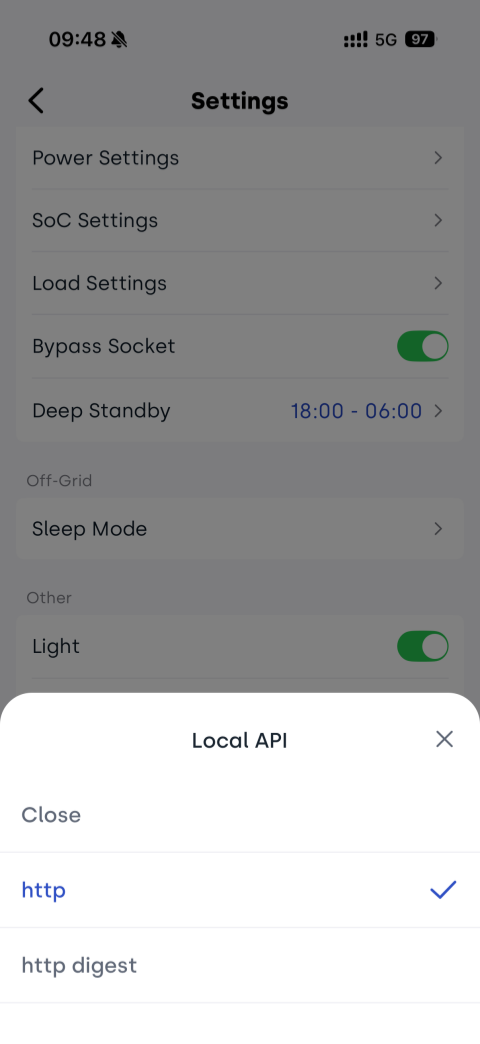
Device APIs are disabled by default and must be enabled before use. OpenData provides three modes:
- HTTP
- HTTP Digest
- HTTPS (Currently unsupported, coming soon)
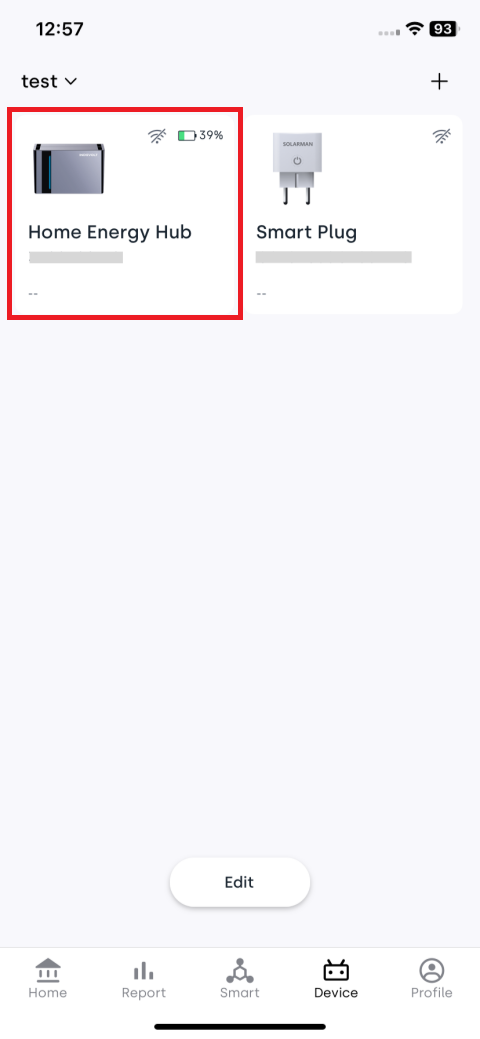
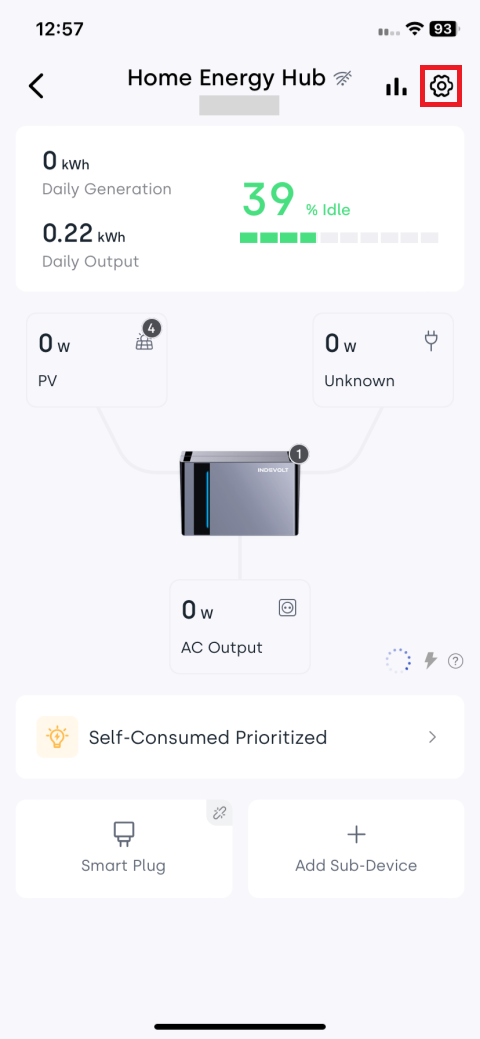
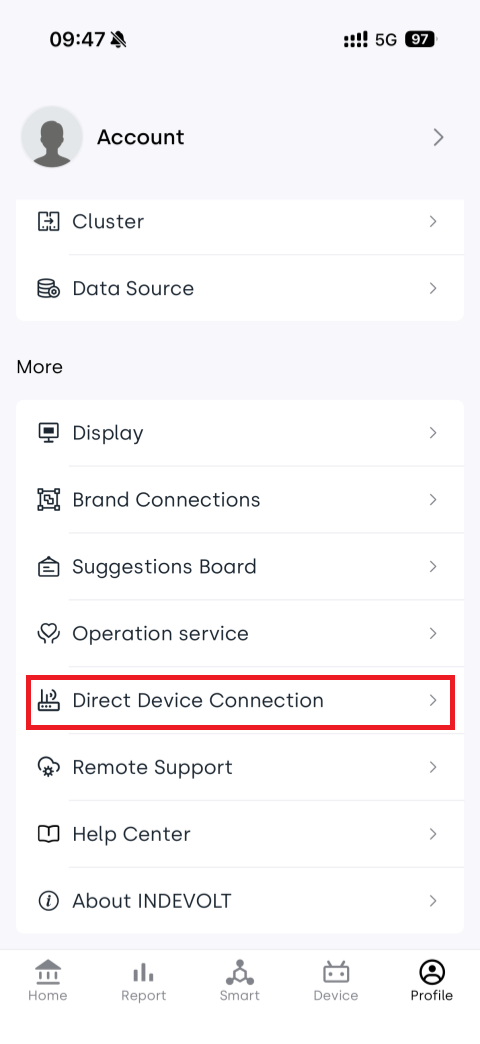
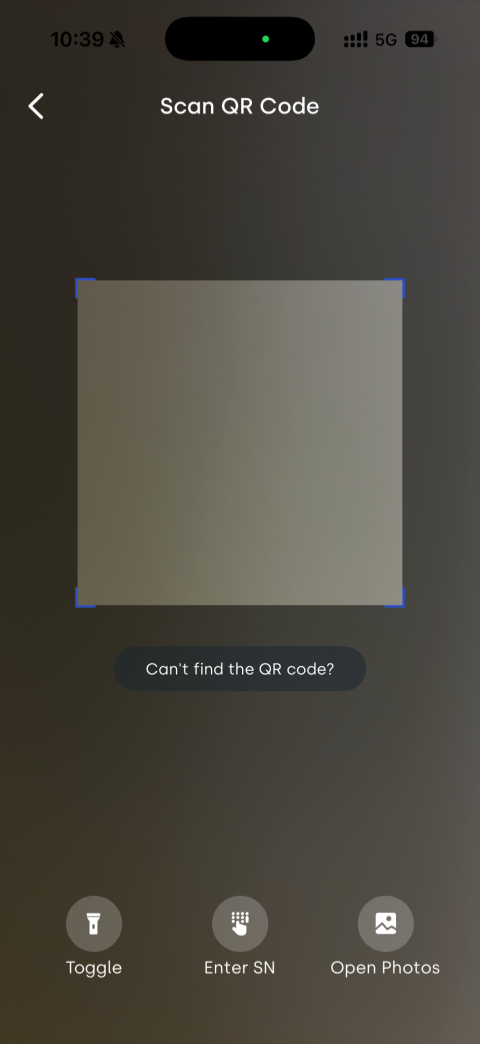
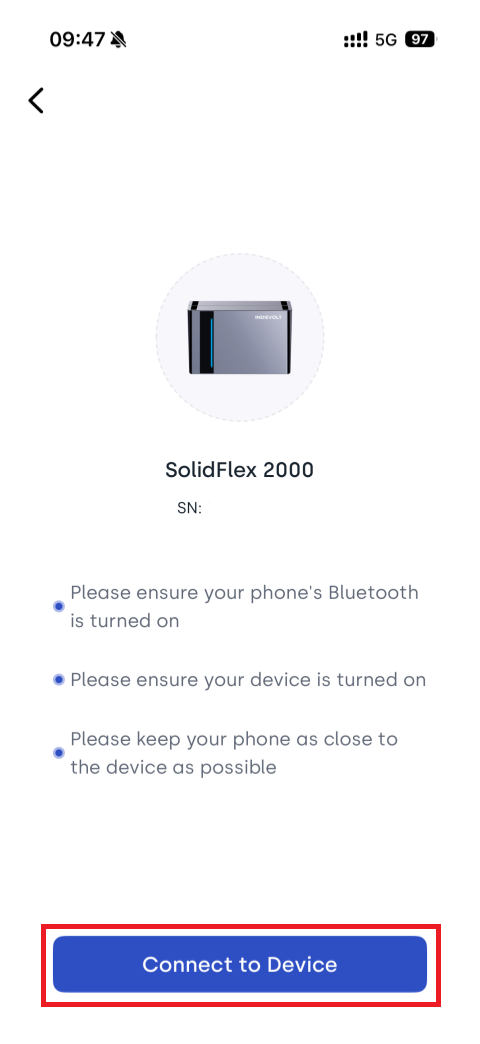
You can configure the Local API in the INDEVOLT App:
- Device is online: It is recommended to use Cloud Configuration, which is simpler to operate
- Device is not online: You can use Local Bluetooth Configuration to connect directly to the device and complete the setup
- Cloud
- Local Bluetooth
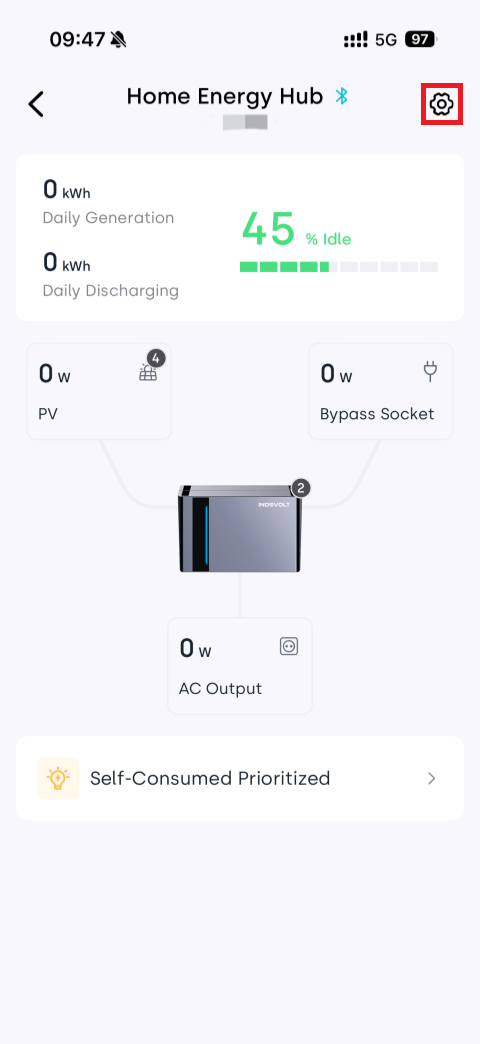
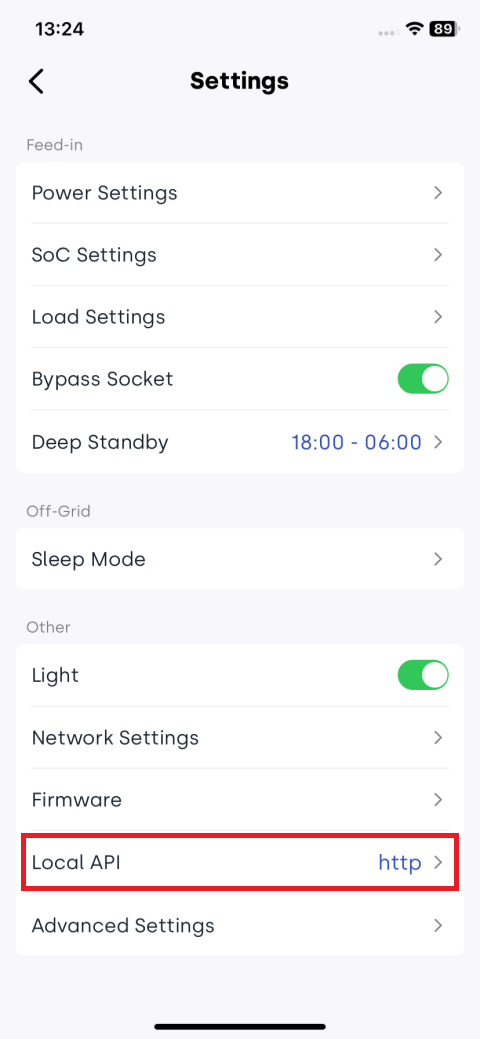
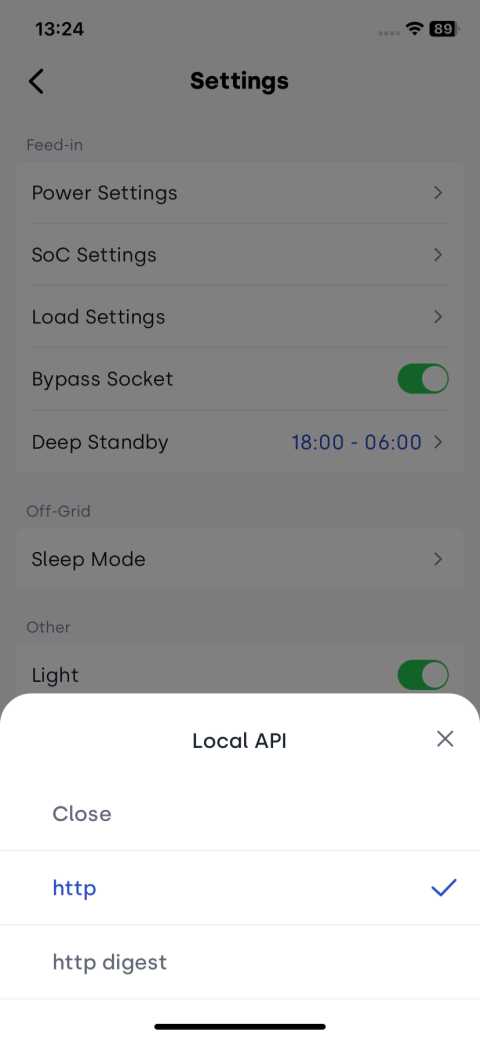
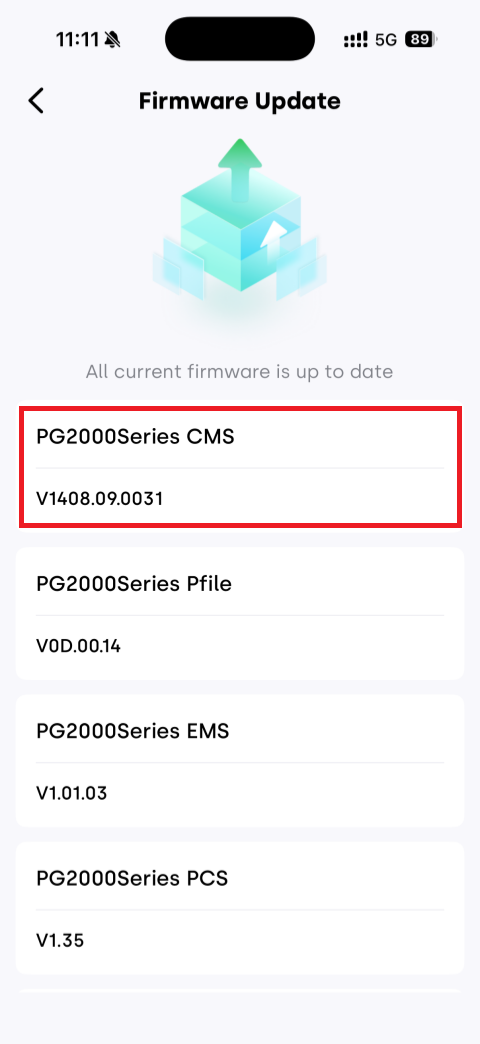
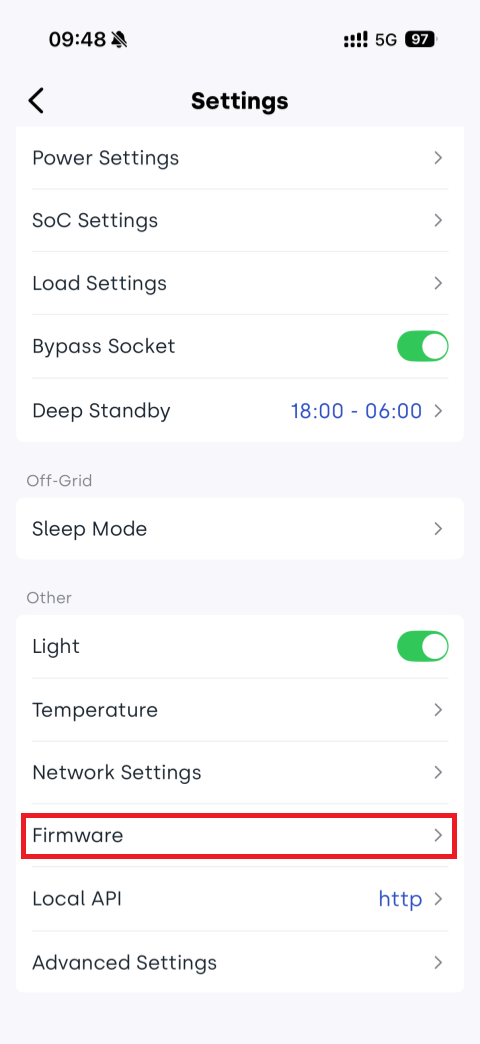
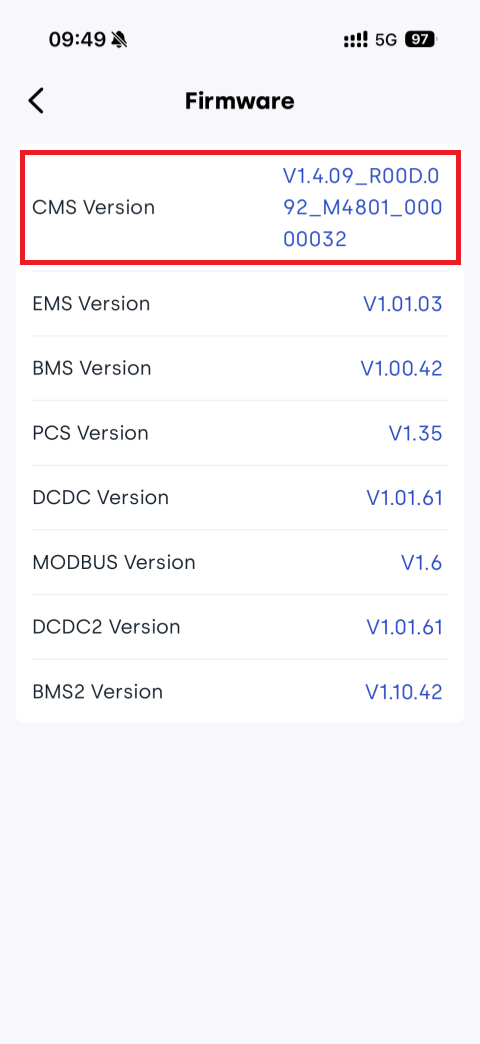
Step 3: Check Firmware Version
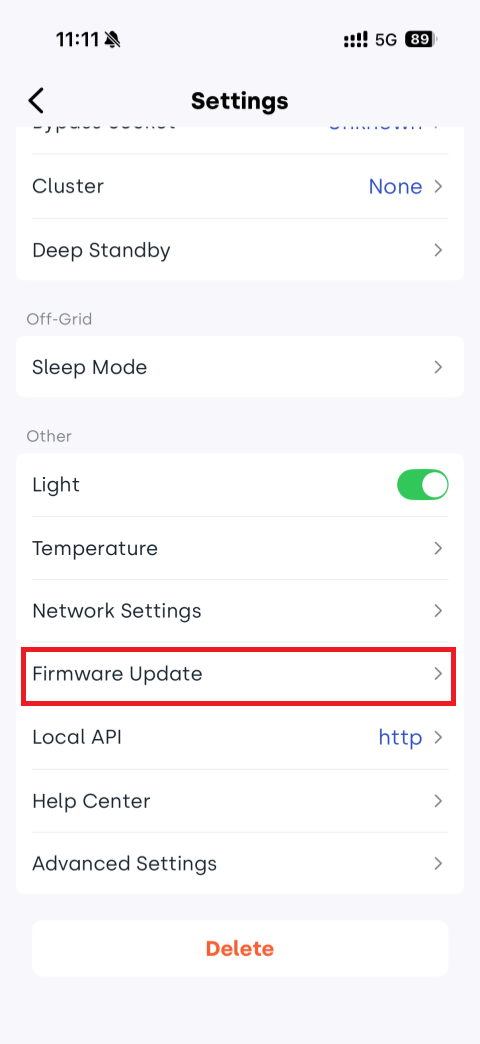
If it is lower than the minimum version listed in the table below, please update the firmware.
Model Applicable firmware version BK1600/BK1600Ultra V1.3.0A_R006.072_M4848_00000039 SolidFlex2000/PowerFlex2000 CMS:CMS:V1406.07.002E You can check the device firmware version in the INDEVOLT app.
- Cloud
- Local Bluetooth
Step 4: Obtain IP Address
Choose any one of the following methods:
🧩Method 1: Query via router’s management list;
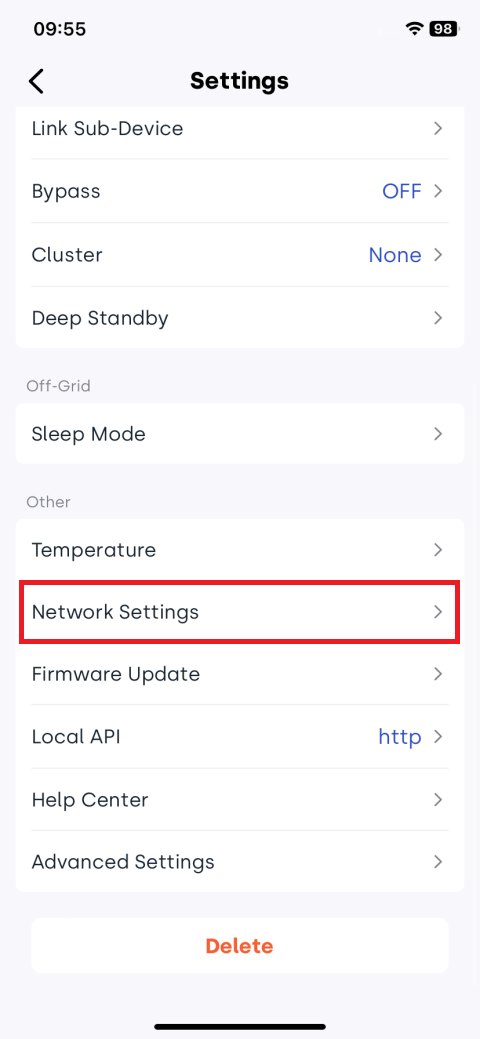
🧩Method 2: Check in App device settings:
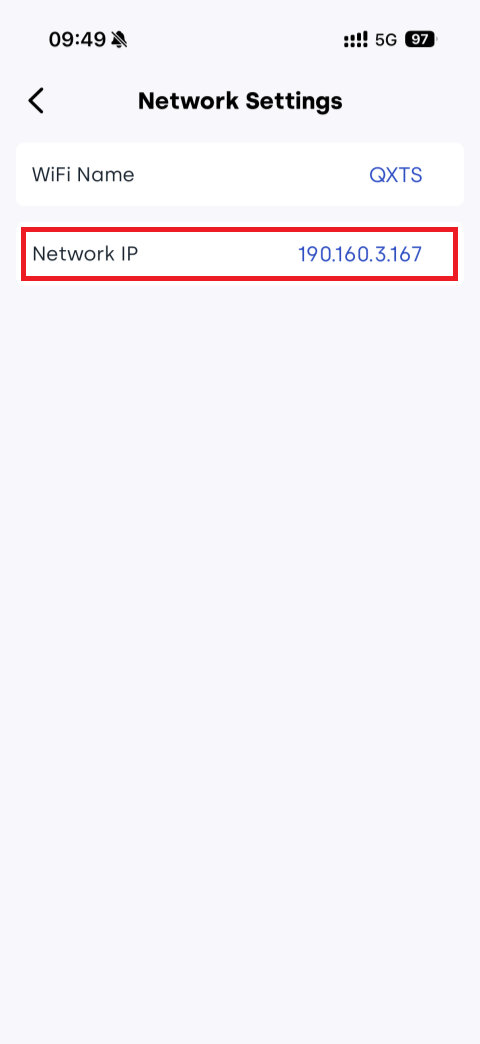
🧩Method 3: Obtain IP via UDP broadcast:
(1) Ensure the device's WiFi network and computer are on the same local area network.
(2) Open a network debugging tool.
(3) Select UDP protocol.
(4) Select Local Host Addr.
(5) Set Local Host Post to 10000.
(6) Click Open.
(7) Configure Remote with broadcast address and port: 255.255.255.255:8099.
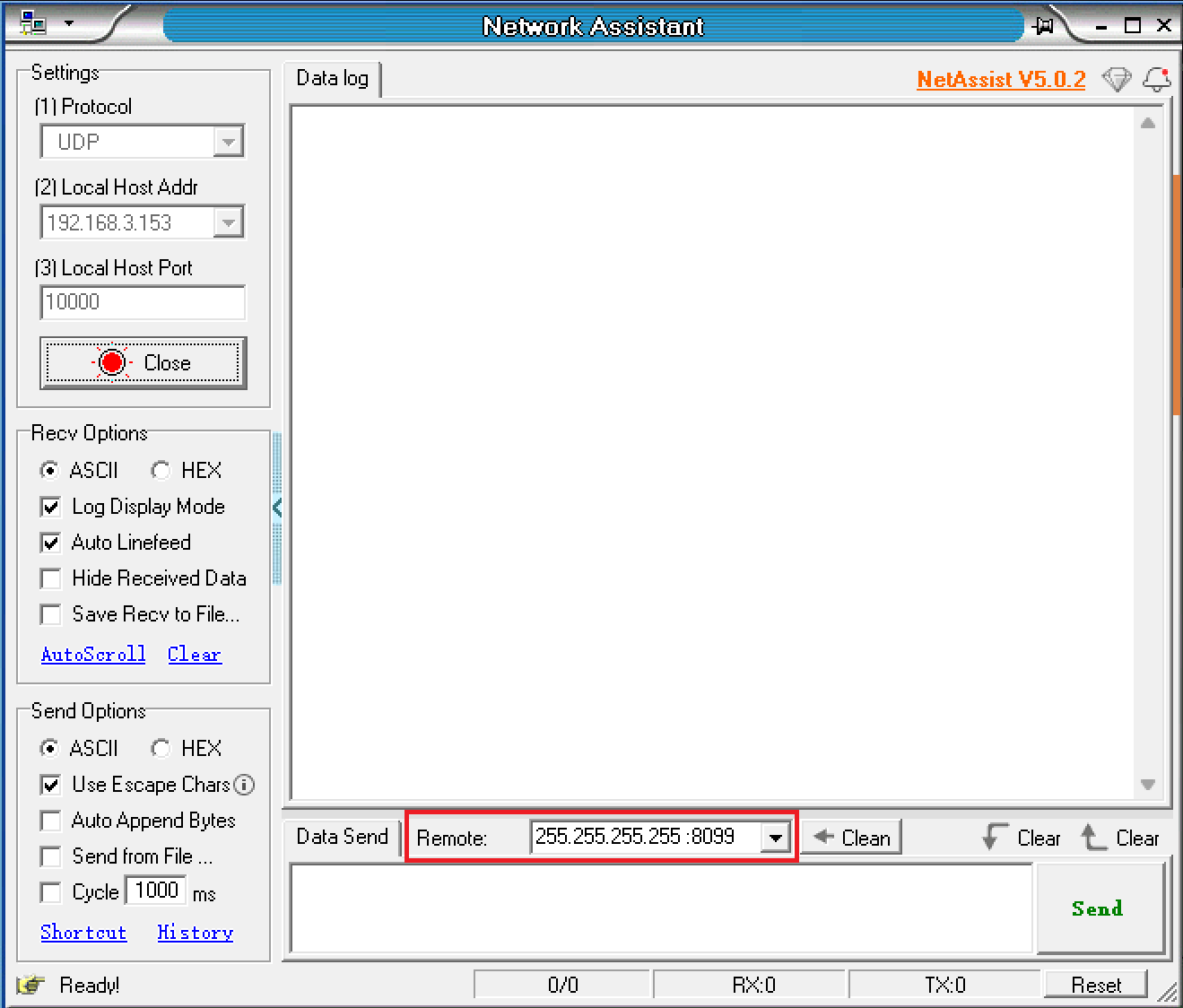
(8) Enter AT command in message box: AT+IGDEVICEIP.
(9) Click Send.
(10) INDEVOLT devices on the same network will respond with their IP address and serial number (SN).

3️⃣ HTTP Usage
3.1 Request Structure
Request Methods
| Method | Description |
|---|---|
| GET | Requests the server to return specified resources. |
| POST | Requests the server to perform specified operations. |
Request Address
http://{IP_ADDRESS}:8080/rpc/{API}
where
{IP_ADDRESS}: Device IP address.{API}: HTTP API to be invoked.
Request Example
-
Retrieve device data:
POST http://192.168.31.213:8080/rpc/Indevolt.GetData?config={"t":[1664,1665]}
cURL command Example
-
Retrieve battery SOC:
curl -g -X POST -H "Content-Type: application/json" "http://192.168.1.75:8080/rpc/Indevolt.GetData?config={\"t\":[6002]}"
3.2 Errors
| Status code | Description | Explanation |
|---|---|---|
| 400 | Bad Request | The server cannot understand the format of the request; the client should modify the request and try again. |
| 401 | Unauthorized | The request requires authentication; the client needs to provide valid credentials. |
| 403 | Forbidden | The server understands the request but refuses to execute it, usually due to permission issues. |
| 404 | Not Found | The server cannot find the requested resource, possibly because the resource does not exist or has been deleted. |
| 405 | Method Not Allowed | The requested method is incompatible with the resource, for example, performing a write operation on a read-only resource. |
| 408 | Request Timeout | The server times out while waiting for the request; the client can retry later. |
| 409 | Conflict | The request conflicts with the current state of the resource, for example, multiple users editing the same resource simultaneously. |
| 410 | Gone | The requested resource has been permanently deleted and there is no new address. |
| 500 | Internal Server Error | The server encounters an unknown error and cannot complete the request. |
| 501 | Not Implemented | The server does not support the requested method and cannot execute it. |
| 502 | Bad Gateway | The server, acting as a gateway or proxy, received an invalid response from the upstream server. |
| 503 | Service Unavailable | The server is currently unable to handle the request, possibly due to overload or maintenance. |
| 504 | Gateway Timeout | The server, acting as a gateway or proxy, did not receive a timely response from the upstream server. |
| 505 | HTTP Version Not Supported | The server does not support the HTTP version used in the request. |
4️⃣ HTTP Digest
Digest Authentication verifies user identity in network communications, preventing plaintext password transmission.
In HTTP + Digest mode:
- New or factory-reset devices must first use the
User.SetConfiginterface to modify the default password. - Other APIs become accessible only after successful password modification.
Required tools
- ASCII to hexadecimal converter
- Hexadecimal to base64 converter
- AES_GCM encryption tool
Password modification example
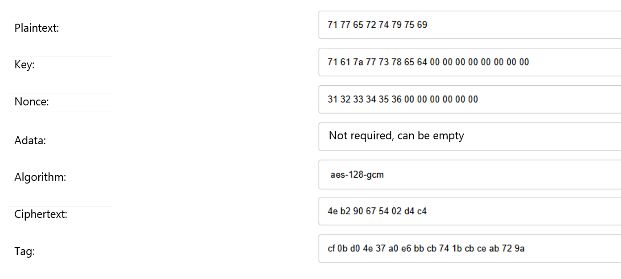
- Convert the new password, original password, and random number from string to hexadecimal.
| ASCII string | Hexadecimal | |
|---|---|---|
| New password | qwertyui | 71 77 65 72 74 79 75 69 |
| Original password | qazwsxed | 71 61 7a 77 73 78 65 64 00 00 00 00 00 00 00 00 (Supplement 0 to 16 bytes) |
| Random number | 123456 | 31 32 33 34 35 36 00 00 00 00 00 00 (Supplement 0 to 12 bytes) |
-
Use AES_GCM encryption tool to encrypt, fill in the corresponding information as follows.
-
Convert ciphertext and tag from hexadecimal to base64.
| Hexadecimal | Base64 | |
|---|---|---|
| Ciphertext | 4e b2 90 67 54 02 d4 c4 | TrKQZ1QC1MQ= |
| Tag | cf 0b d0 4e 37 a0 e6 bb cb 74 1b cb ce ab 72 9a | zwvQTjeg5rvLdBvLzqtymg== |
-
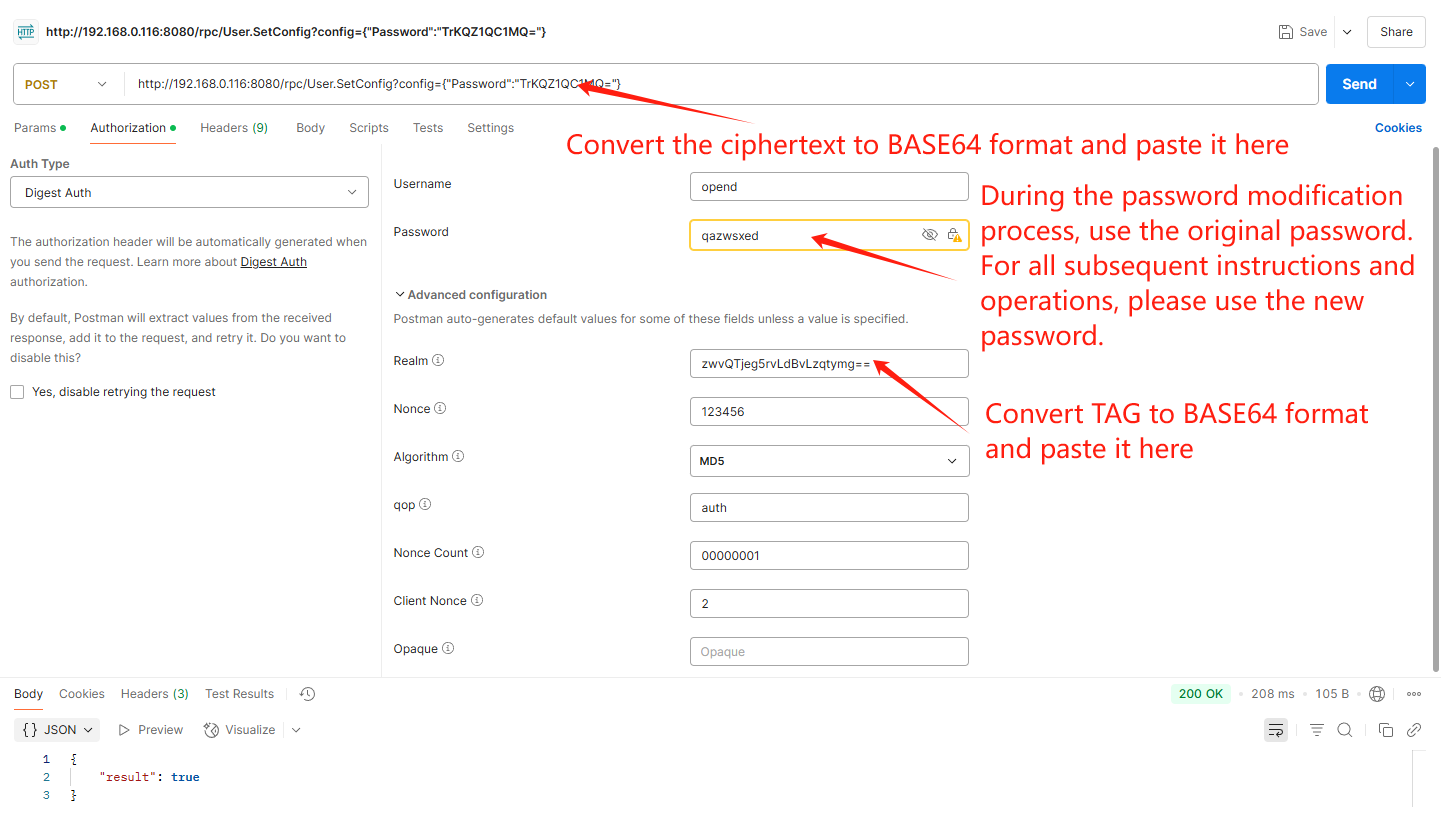
Complete the digest authentication fields and send the
User.SetConfigrequest with the new password. The result returns true, indicating successful modification.POST
http://{IP_ADDRESS}:8080/rpc/User.SetConfig?config={"Password":"{PASSWORD}"}where
{IP_ADDRESS}:Device IP address.{PASSWORD}:Base64-encoded ciphertext encrypted with AES128-GCM.
| Parameter | Type | Description | Attribute |
|---|---|---|---|
| Username | String | Default opend | required |
| Password | String | Default device key. - Using the default password can only request the User.SetConfig interface to change the password. - Once the password is modified, using the modified password can request other interfaces. | required |
| Realm | String | - If calling the User.SetConfig interface to update the password, you need to pass the AES128-GCM tag value. - If calling other interfaces in Base64 format, you may use a random value. | required |
| Nonce | Default type of Digest | Random values can be used | required |
| Algorithm | Default type of Digest | MD5 | required |
| qop | Default type of Digest | auth | required |
| Nonce Count | Default type of Digest | Random values can be used | required |
| Client Nonce | Default type of Digest | Random values can be used | required |
5️⃣ API
| Component | Description |
|---|---|
Indevolt | Retrieve device data and control device. |
Sys | Obtain CMS (Communication Management System) information. |
6️⃣ Indevolt
Indevolt allows you to retrieve real-time device data and send control commands by making standard HTTP requests.
6.1 Retrieve device data
-
Request
POST
http://192.168.31.213:8080/rpc/Indevolt.GetData?config={"t":[1664,1665]} -
Response
{
 "1664":100,
 "1665":251
}
Function:
Indevolt.GetDataParameter
Parameter Type Description config Object t: The request address for data, specified in thecJSON Pointcolumn of the table below.Return value
Device data in JSON format.
- SolidFlex2000/PowerFlex2000
- BK1600/BK1600Ultra
cJSON Point cJSON Value Type Unit Point Description Enum Definition API Annotation SN 0 String Device SN Indevolt.GetDataFirmware Version Information 1118 String PG2000Series EMS Indevolt.GetData1109 String PG2000Series BMS-MB Indevolt.GetData1119 String PG2000Series PCS Indevolt.GetData1120 String PG2000Series DCDC Indevolt.GetData1136 String SFA/PFA DCDC1 Indevolt.GetData1137 String SFA/PFA BMS1 Indevolt.GetData1138 String SFA/PFA DCDC2 Indevolt.GetData1139 String SFA/PFA BMS2 Indevolt.GetData1140 String SFA/PFA DCDC3 Indevolt.GetData1141 String SFA/PFA BMS3 Indevolt.GetData1142 String SFA/PFA DCDC4 Indevolt.GetData1143 String SFA/PFA BMS4 Indevolt.GetData1098 String SFA/PFA DCDC5 Indevolt.GetData1099 String SFA/PFA BMS5 Indevolt.GetDataSystem Operating Information 7101 Enum Working Mode 1: Self-consumed Prioritized
4: Real-time Control
5: Charge/Discharge ScheduleIndevolt.GetData142 Num kWh Rated Capacity Indevolt.GetData2618 Num Grid Charging 1000: Disable
1001: EnableIndevolt.GetData11009 Num W Inverter Input Limit Indevolt.GetData2101 Num W Total AC Input Power Indevolt.GetData2108 Num W Total AC Output Power Indevolt.GetData11010 Num W Feed-in Power Limit Indevolt.GetData11011 Num W Max AC Output Power Indevolt.GetData680 Num Bypass 0: Disable
1: EnableIndevolt.GetData11039 Num Bypass mode 0: Eps
1: M-InvIndevolt.GetDataAutomatically switch according to forward and reverse current 6105 Num % Backup SOC Indevolt.GetData7171 Num Light 0: Disable
1: EnableIndevolt.GetData8646 Num Day Battery Calibration: Cycle 0-60
0: OFFIndevolt.GetDataOperating time without full charge 8647 Num Time Battery Calibration: Start Time DEC-->HEX
H: hour
L: minuteIndevolt.GetDatae.g.: 256-->0100
01(HEX-H)-->01h
00(HEX-L)-->00min2802 Num W Battery Calibration: Charging power (AC) Indevolt.GetDataCluster Information 606 Enum Master-slave identification 1000: Master
1001: Slave
1002: NoneIndevolt.GetDataBypass Power 667 Float W Bypass power Indevolt.GetDataReal-time power flowing through the bypass path.
- Grid-tied: power may come from the microinverter or be supplied directly to loads
- Off-grid: power is directly supplied to loadsElectrical Energy Information 2107 Num kWh Total AC Input Energy Indevolt.GetDataTotal energy imported from the grid. This energy can be used to charge the battery or directly supply loads through bypass. 2104 Num kWh Total AC Output Energy Indevolt.GetDataComprehensive electrical energy, including (DC+AC+Bypass) 11035 Num Wh Daily bypass M-inv input energy Indevolt.GetDataDaily energy coming from the microinverter. This is only available in grid-tied mode, when the system is connected to a microinverter. 11034 Num Wh Total bypass M-inv input energy Indevolt.GetDataTotal energy coming from the microinverter. This is only available in grid-tied mode, when the system is connected to a microinverter. 11037 Num KWh Daily off-grid bypass output energy Indevolt.GetDataDaily electrical energy of off - grid bypass discharge 2105 Num KWh Total off-grid bypass output energy Indevolt.GetDataTotal electrical energy of off-grid bypass discharge 9285 Num Wh Daily bypass output energy Indevolt.GetDataDaily electrical energy of bypass discharge (grid-connected + off-grid) 9284 Num Wh Total bypass output energy Indevolt.GetDataTotal electrical energy of bypass discharge (grid-connected + off-grid) 1502 Num kWh Daily PV Generation Indevolt.GetData1505 Num Wh Cumulative Production Indevolt.GetData6004 Num kWh Battery Daily Charging Energy Indevolt.GetData6005 Num kWh Battery Daily Discharging Energy Indevolt.GetData6006 Num kWh Battery Total Charging Energy Indevolt.GetData6007 Num kWh Battery Total Discharging Energy Indevolt.GetDataElectricity Meter Status 7120 Enum Meter Connection Status 1000: Enable
1001: DisableIndevolt.GetData11016 Float W Meter Power Indevolt.GetDataGrid Information 2600 Num V Grid Voltage Indevolt.GetData2612 Num Hz Grid Frequency Indevolt.GetDataBattery Pack Operating Parameters 6001 Enum Battery Charge/Discharge State 1000: Static
1001: Charging
1002: DischargingIndevolt.GetData6000 Num W Battery Power Indevolt.GetData6002 Num % Battery SOC Total Indevolt.GetData9008 String Batt SN-MB Indevolt.GetData9000 Num % Batt SOC-MB Indevolt.GetData9004 Num V Batt V-MB Indevolt.GetData9013 Num A Batt I-MB Indevolt.GetData9012 Num ℃ Batt Temp-MB Indevolt.GetData9009 Num V Batt Cell1 V-MB Indevolt.GetData9011 Num V Batt Cell2 V-MB Indevolt.GetData9032 String Batt SN-Pack1 Indevolt.GetData9016 Num % Batt SOC-Pack1 Indevolt.GetData9020 Num V Batt V-Pack1 Indevolt.GetData19173 Num A Batt I-Pack1 Indevolt.GetData9030 Num ℃ Batt Temp-Pack1 Indevolt.GetData9021 Num V Batt Cell1 V-Pack1 Indevolt.GetData9023 Num V Batt Cell2 V-Pack1 Indevolt.GetData9051 String Batt SN-Pack2 Indevolt.GetData9035 Num % Batt SOC-Pack2 Indevolt.GetData9039 Num V Batt V-Pack2 Indevolt.GetData19174 Num A Batt I-Pack2 Indevolt.GetData9049 Num ℃ Batt Temp-Pack2 Indevolt.GetData9040 Num V Batt Cell1 V-Pack2 Indevolt.GetData9042 Num V Batt Cell2 V-Pack2 Indevolt.GetData9070 String Batt SN-Pack3 Indevolt.GetData9054 Num % Batt SOC-Pack3 Indevolt.GetData9058 Num V Batt V-Pack3 Indevolt.GetData19175 Num A Batt I-Pack3 Indevolt.GetData9068 Num ℃ Batt Temp-Pack3 Indevolt.GetData9059 Num V Batt Cell1 V-Pack3 Indevolt.GetData9061 Num V Batt Cell2 V-Pack3 Indevolt.GetData9165 Num Batt SN-Pack4 Indevolt.GetData9149 Num % Batt SOC-Pack4 Indevolt.GetData9153 Num V Batt V-Pack4 Indevolt.GetData19176 Num A Batt I-Pack4 Indevolt.GetData9163 Num ℃ Batt Temp-Pack4 Indevolt.GetData9154 Num V Batt Cell1 V-Pack4 Indevolt.GetData9156 Num V Batt Cell2 V-Pack4 Indevolt.GetData9218 String Batt SN-Pack5 Indevolt.GetData9202 Num % Batt SOC-Pack5 Indevolt.GetData9206 Num V Batt V-Pack5 Indevolt.GetData19177 Num A Batt I-Pack5 Indevolt.GetData9216 Num ℃ Batt Temp-Pack5 Indevolt.GetData9219 Num V Batt Cell1 V-Pack5 Indevolt.GetData9222 Num V Batt Cell2 V-Pack5 Indevolt.GetDataPV Operating Parameters 1501 Num W Total DC Output Power Indevolt.GetData1632 Num A DC Input Current 1 Indevolt.GetData1600 Num V DC Input Voltage 1 Indevolt.GetData1664 Num W DC Input Power 1 Indevolt.GetData1633 Num A DC Input Current 2 Indevolt.GetData1601 Num V DC Input Voltage 2 Indevolt.GetData1665 Num W DC Input Power 2 Indevolt.GetData1634 Num A DC Input Current 3 Indevolt.GetData1602 Num V DC Input Voltage 3 Indevolt.GetData1666 Num W DC Input Power 3 Indevolt.GetData1635 Num A DC Input Current 4 Indevolt.GetData1603 Num V DC Input Voltage 4 Indevolt.GetData1667 Num W DC Input Power 4 Indevolt.GetData
cJSON Point cJSON Value Type Unit Point Description Enum Definition API 0 Float Device SN Indevolt.GetData7101 Enum Working mode 0: Outdoor Portable
1: Self-consumed Prioritized
5: Charge/Discharge ScheduleIndevolt.GetData1664 Float W DC Input Power1 Indevolt.GetData1665 Float W DC Input Power2 Indevolt.GetData2108 Float W Total AC Output Power Indevolt.GetData1502 Float kWh Daily Production Indevolt.GetData1505 Float 0.001kWh Cumulative Production Indevolt.GetData2101 Float W Total AC Input Power Indevolt.GetData2107 Float kWh Total AC Input Energy Indevolt.GetData1501 Float W Total DC Output Power Indevolt.GetData6000 Float W Battery Power Indevolt.GetData6001 Enum Battery Charge/Discharge State 1000: Static
1001: Charging
1002: DischargingIndevolt.GetData6002 Float % Battery SOC Indevolt.GetData6105 Float % Emergency power supply Indevolt.GetData6004 Float kWh Battery Daily Charging Energy Indevolt.GetData6005 Float kWh Battery Daily Discharging Energy Indevolt.GetData6006 Float kWh Battery Total Charging Energy Indevolt.GetData6007 Float kWh Battery Total Discharging Energy Indevolt.GetData7120 Enum Meter Connection Status 1000: Enable
1001: DisableIndevolt.GetData21028 Float W Meter Power Indevolt.GetData
6.2 Control device
-
Request
POST
http://192.168.31.213:8080/rpc/Indevolt.SetData?config={"f":16,"t":47005,"v":[4]} -
Response
{"result": true}
-
Request
POST
http://192.168.31.213:8080/rpc/Indevolt.SetData?config={"f":16,"t":47015,"v":[2,700,5]} -
Response
{"result": true}
Function:
Indevolt.SetDataParameter
Parameter Type Description config Object f: function code, 16 by default;t: register address, see thecJSON Pointcolumn in the table below;v: write value, see theValuecolumn in the table below.
- SolidFlex2000/PowerFlex2000
- BK1600/BK1600Ultra
cJSON Point cJSON Value Type Unit Point Description Value API 47005 Enum Mode Setting 1: Self-consumed Prioritized
4: Real-time control
5: Charge/Discharge ScheduleIndevolt.SetData47015 UINT State Setting (Only available in real-time control) 0: Standby
1: Charging
2: DischargingIndevolt.SetData47016 INT W Power Setting (Only available in real-time control) MAX Charging: 50–2400
MAX Discharging: 50–2400Indevolt.SetData47017 UINT % SOC Setting (Only available in real-time control) 5-100 Indevolt.SetData1147 INT W Max AC Output Power Setting 50-2400 Indevolt.SetData1146 INT W Feed-in Power Limit Setting 50-2400 Indevolt.SetData1143 UINT Grid Charging Setting 0: Disable
1: EnableIndevolt.SetData1138 INT W Inverter Input Limit Setting 100-2400 Indevolt.SetData1 Enum Load Setting 1: Smart Plug
2: Meter
3: Key Load
4: CustomIndevolt.SetData7266 Enum Bypass Setting 0: Disable
1: EnableIndevolt.SetData1142 INT % Backup SOC Setting Indevolt.SetData7265 Enum Light Setting 0: Disable
1: EnableIndevolt.SetData
cJSON Point cJSON Value Type Unit Point Description Value API 47005 Enum Mode 1: Self-consumed Prioritized
2: Charge/discharge Schedule
4: Real-time ControlIndevolt.SetData47015 UINT State 0: Standby
1: Charging
2: DischargingIndevolt.SetData47016 INT W Power Charging: 0-1200
Discharging: 0-800Indevolt.SetData47017 UINT % SOC 0-100 Indevolt.SetDatainfoIn real-time control mode, device charging/discharging can be controlled by simultaneously writing state, power, and SOC values.
Return value
Parameter Type Description resultBool true: success;false: failure.
7️⃣ Sys
This class is used to obtain firmware version, including CMS (Communication Management System) information.
-
Request
GET
http://192.168.31.213:8080/rpc/Sys.GetConfig -
Response
{
  "device": {
    "hostname": "",
    "timezone": 480,
    "type": "CMS-SF2000",
    "sn": "",
    "mac": "7C3E82EF997F",
    "fw": "T1.4.06_ROOD. 072_M4801_0000002C",
    "f_ver": "T1406.07.002C",
    "p_ver": "VOD.00.08",
    "time": "2025-12-18 09:44:57",
    "time_stamp": 1766051097,
    "run_time": 2244
  }
}
Function:
Sys.GetConfigReturn value
Parameter Type Description deviceObject See the table below for device configuration information. device configuration
Parameter Type Description hostnameString Device name timezoneNum Timezone typeString Device model snString Device serial number macString Device MAC address fwString Device firmware version f_verString PG2000Series CMS p_verString PG2000Series Pfile timeString Current time time_stampNum Current timestamp (in seconds) run_timeNum Device runtime (in seconds)
8️⃣ FAQ
Q: HTTP request returns 401 Unauthorized.
- Verify the username and password for Digest Authentication.
- New/factory-reset devices only support access to the designated interface:
User.SetConfig. Refer to Digest Authentication section - other APIs become accessible after successful password modification and authentication with the new password.
Q: Device fails to return IP address after broadcast command.
The OpenData API is not enabled, making this function inactive. Refer to Enable API section.